Dynamics 365 CRM Consulting & Implementation
Most Dynamics 365 CRM rollouts stop at the standard forms. Six months later, reps are keeping a spreadsheet next to the CRM and the pipeline number in your forecast review doesn't match what's in the system. We implement Dynamics 365 CRM end to end, then build the automation and reporting layer that makes it the system people actually use.
What Is Dynamics 365 CRM Consulting?
Dynamics 365 CRM consulting is the work of implementing, configuring, and integrating Microsoft's Sales, Customer Service, and Field Service applications so a team runs its deal cycle, support queue, and field operations inside one system, not a spreadsheet next to it. Sunflower Lab handles the full cycle: data migration, configuration, Power Platform automation, and the Copilot layer that decides whether the CRM gets used daily or ignored.
Your Dynamics 365 CRM Is Probably a Very Expensive Contact List. Here's Why.
Dynamics 365 CRM has real momentum, with Sales, Customer Service, and Field Service now running on the same Copilot-infused platform. But owning the license and running the deal cycle inside it are two different things. We see the same three failures across Dynamics 365 CRM environments:
Reps keep their own spreadsheet
The CRM has the forms, but nobody trusts the data enough to work out of it exclusively.
Data entry is inconsistent
Duplicate accounts, incomplete contact records, and lead scoring nobody configured past the default.
The forecast doesn't match the pipeline
Leadership pulls a number for the board deck that doesn't match what's actually sitting in the system.
If any of that sounds familiar, it's rarely the software. It's that implementation stopped at go-live.
Full-Cycle Dynamics 365 CRM Implementation
Getting the Data and Process Right
Before automation or reporting means anything, the underlying data and process need to hold up. We work on:
- Module and licensing strategy — which of Sales, Customer Service, and Field Service your team actually needs, not the full suite by default
- Data model design and migration from a legacy CRM, spreadsheets, or a platform like Salesforce or HubSpot
- Business process flows, forms, and views configured around how your team actually sells and services
- Security roles and business units set up so the right people see the right records, nothing more
- Server-side sync for email and calendar so activity logs itself instead of relying on reps to type notes
Making the CRM Something People Actually Use
Once the foundation is solid, the CRM can start doing work on its own. We build:
- Power Automate workflows for lead routing, case escalation, and approval chains
- Power BI dashboards for pipeline, service SLAs, and field technician utilization
- Power Apps for the exception workflows Dynamics 365's standard screens don't cover
- Copilot configuration for AI-assisted case summaries, email drafting, and next-best-action
- Integration with Microsoft 365 and, where relevant, Business Central or Finance and Operations
Running Sales and Marketing together and need the lead-scoring and handoff story specifically?
See Dynamics 365 Sales & Marketing →Dynamics 365 CRM vs. Salesforce
Both are proven CRM platforms. Here's what actually differs when you're choosing, or already standardized on Microsoft.
| Feature | Dynamics 365 CRM | Salesforce |
|---|---|---|
| Microsoft 365 integration | Native — Outlook, Teams, SharePoint built in | Requires third-party connectors |
| Licensing model | Per-app — mix Sales, Service, Field Service as needed | Per-user, tiered editions across clouds |
| Data platform | Dataverse, shared across Power Platform apps | Salesforce Data Cloud, separate architecture |
| AI layer | Copilot, native to the platform | Agentforce / Einstein, added by edition |
| Customization | Power Apps and Power Automate, low-code | Apex and Flow, more developer-dependent |
| Best fit | Teams already standardized on Microsoft 365 | Teams prioritizing CRM-specific ecosystem depth |
What This Looks Like in Practice
Cold Storage & Logistics: From Weekly Excel Exports to Real-Time KPIs
Core X Partners runs cold storage and logistics across multiple warehouses. Dynamics 365 was already their system of record, but the team was still updating operational metrics in Excel every week. We built the integration layer connecting Dynamics 365, their warehouse management system, and their CRM data directly into Power BI. Result: 16 warehouses reporting in real time, 3 systems unified into one dashboard, zero manual weekly Excel exports left.
View Case Study
Inspections From 15 Minutes to Seconds
Dominion Engineering's product inspections took 15 minutes each, with data scattered across disconnected systems. We connected SharePoint and Dynamics 365 through Power Automate, auto-generating inspection tickets and Teams alerts on every receipt trigger. Result: inspection time cut to seconds, 10-15 hours saved weekly, and 60 hours saved monthly in receivables.
View Case Study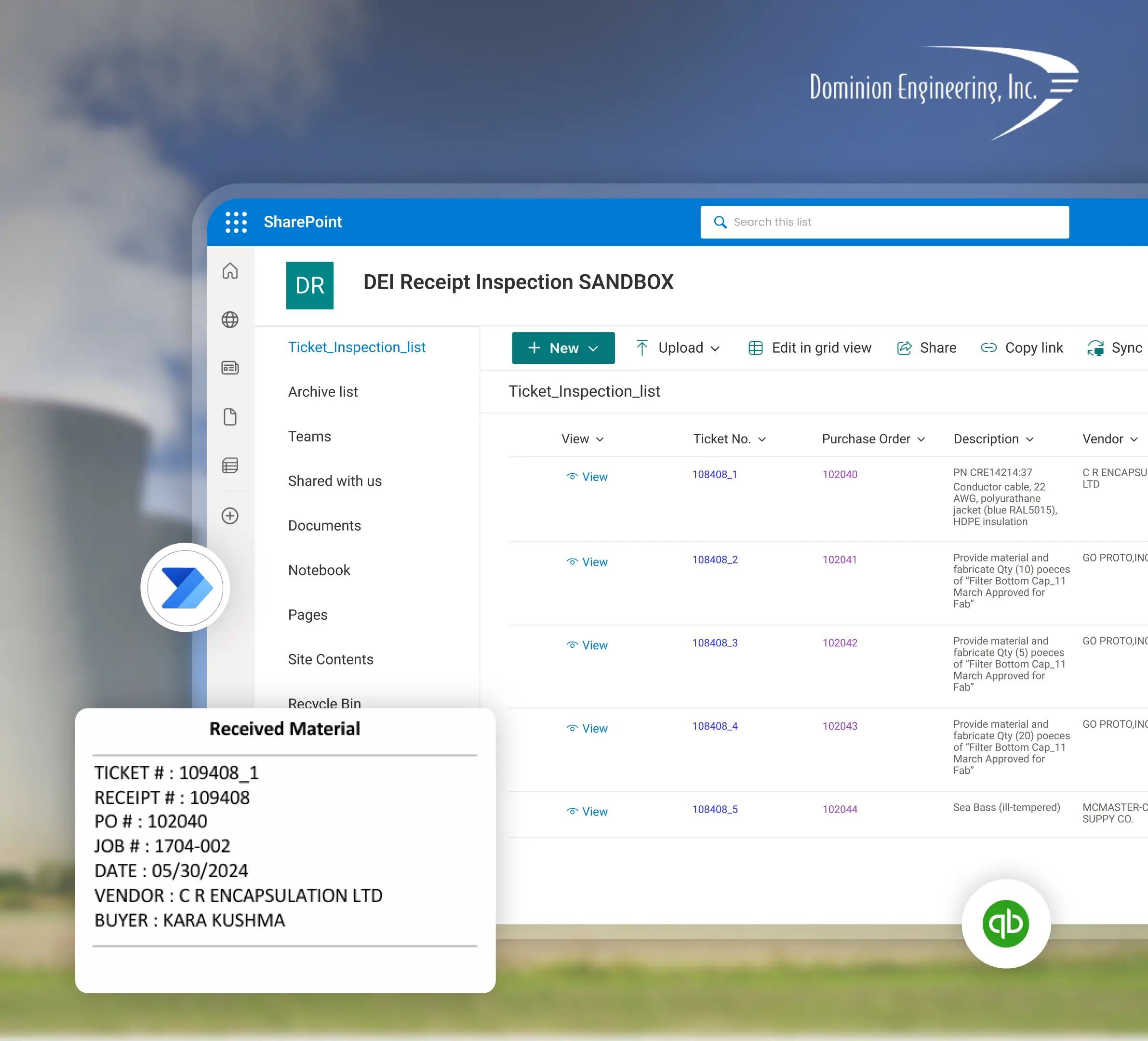
Planning a Dynamics 365 CRM Implementation with Sunflower Lab
Discovery & CRM Audit
We map your current sales and service process, data quality, and where reps are working around the system.
Data & Process Design
Migration plan, data model, and automation scope, with a fixed-price roadmap before any build starts.
Build & Migrate
Configuration, data migration, and automation built in focused sprints.
Adopt & Scale
Training, adoption support, and ongoing tuning as usage and the Copilot layer grow.
Frequently Asked Questions
Talk to our Dynamics 365 CRM experts
Free 30-minute discovery call. We'll audit your current CRM setup, estimate migration scope, and map out the automation layer.