Business Central Implementation Partner for Your Growing Business
Most Dynamics 365 Business Central implementation partners hand you a configured system and disappear. We implement Business Central built to connect to Power BI, Power Automate, and Power Apps from day one, so your financial data doesn't stay stuck the way your last system's did.
What Is Business Central Consulting?
Business Central consulting is the work of evaluating, implementing, integrating, and optimizing Microsoft's cloud ERP for small and mid-sized companies. It covers license selection and fit-gap analysis through module configuration, data migration, third-party integrations, and post-go-live support. A Business Central consultant's job isn't finished at go-live. It's finished when finance, sales, and operations are actually running on the system instead of working around it.
Your ERP Shouldn't Mean a Weekly Excel Export
Business Central is Microsoft's ERP for companies that have outgrown QuickBooks, Sage, or a spreadsheet-based finance stack but don't need the complexity, or cost, of Dynamics 365 Finance and Operations. Microsoft puts the installed base at over 50,000 organizations worldwide, most in the 20 to 1,000 employee range.
Month-end takes days
Finance is reconciling three systems by hand instead of closing the books.
Systems don't talk
Sales, inventory, and accounting live in separate tools with no shared data.
Leadership waits on a spreadsheet
A weekly Excel export is still the only way to see real numbers.
That's rarely a software problem. It's a scoping and implementation-partner problem, which is exactly what the sections below address.
Business Central Consulting, Implementation & Integration
We work across the full Business Central lifecycle: getting you live on the platform, connecting it to everything else you run on, and keeping it optimized after go-live. Most partners specialize in one of these. We built the firm around doing all three without a handoff between teams.
Live, Built to Connect From Day One
The end-to-end process of configuring Business Central to your business, migrating your data, and getting your team live: chart-of-accounts and G/L setup, module configuration, data migration, integration design, testing, and training.
Most implementation partners treat Power BI, Power Automate, and Power Apps as a phase two nobody schedules. We scope them in from the start, so the rollout doesn't just relocate the busywork instead of removing it.
- Discovery and data audit against your current systems
- Chart of accounts, G/L, and core module configuration
- Data migration and validation from your legacy system
- User roles, approval workflows, and security setup
- Integration and automation design built in, not bolted on
- Testing, go-live support, and user training
Connecting to Everything Else You Run On
Connecting your ERP to the other systems your business already runs on, so data moves automatically instead of getting re-typed. Business Central ships with native connectors for the most common cases and an open API layer for everything else.
- Power BI for real-time financial dashboards
- Power Automate for approval routing and PO workflows
- Power Apps for workflows standard screens don't cover
- Shopify & ecommerce for two-way order and inventory sync
- CRM systems (Dynamics 365 Sales, Salesforce)
- WMS, payroll & legacy systems via custom API
This is the layer most partners treat as an afterthought and the one we specialize in. If your go-live is done but reporting still means a manual export, this is where we start.
Explore Power Automate Development →See Power BI Development Services →
Before You Commit, and After You Go Live
The advisory work around implementation: license selection, fit-gap analysis, performance optimization for a system you're already running, and recovery for a rollout that stalled or underdelivered.
- Evaluating Business Central against QuickBooks, NetSuite, or Sage
- Auditing an existing instance that's underused or misconfigured
- Rescuing a stalled or over-budget implementation from another partner
- Planning a phased rollout across multiple entities or locations
- Ongoing managed support after another partner's implementation ended at go-live
Retiring Dynamics NAV or GP the Right Way
Microsoft has pushed both legacy on-premise ERPs toward end of support, and NAV and Dynamics GP customers are working through the same decision: upgrade in place or move to Business Central. We handle the migration end to end, including the customizations and integrations that made the old system usable in the first place.
NAV to Business Central
Your core data structure carries over cleanly if your NAV environment is on a supported version and reasonably well organized. The real work is converting old C/AL customizations into modern AL extensions, so they survive Business Central's twice-yearly update cycle instead of breaking on the next release.
Dynamics GP to Business Central
GP doesn't upgrade in place, so this is a re-implementation: financials, customers, vendors, and inventory history migrated and validated, GP customizations rebuilt as Business Central extensions, and your team trained on a genuinely different interface, not a GP reskin.
What This Looks Like in Practice
Cold Storage & Logistics: 16 Sites, 4 Systems, Zero Manual Exports
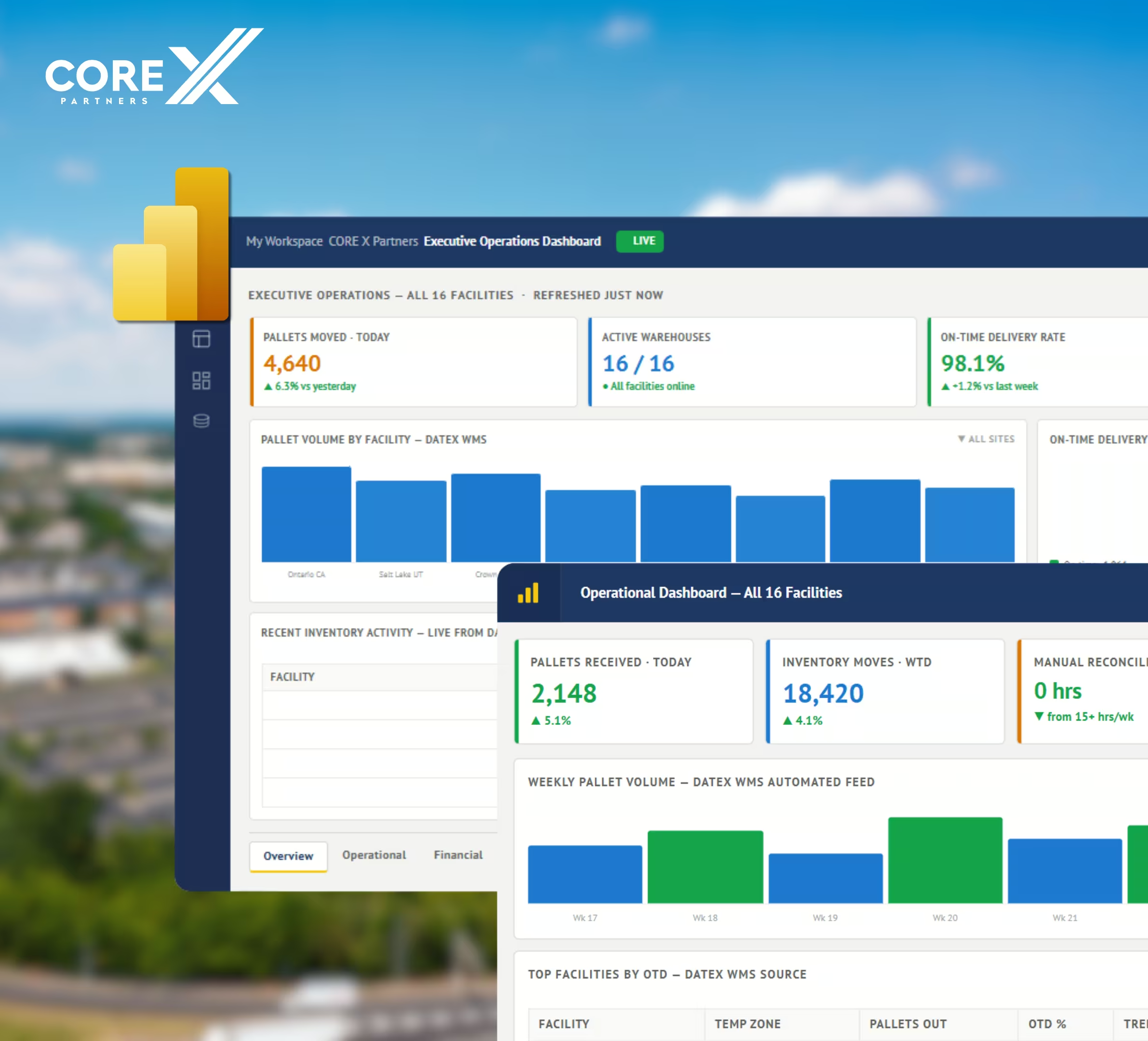
Core X Partners runs 16 cold storage facilities nationwide, each with its own operator and its own reporting workflow. Their ERP, WMS (Datex), CRM (Salesforce), and payroll system (UKG) all held pieces of the picture, but nobody had the whole thing without a manual pull. We built the integration layer connecting all four systems into a single Power BI model with automated refresh.
Proof the Integration Layer Works, Regardless of Your ERP
United Utility runs Sage 300, not Business Central, but the problem was the same one Business Central customers hit after go-live: seven operating divisions, each with different rules and rates, all reporting through manual timesheets and spreadsheets. We connected their ERP to Power Apps, Power BI, and Power Automate. It's the same integration layer we build around Business Central, applied to whatever core system you're actually running.

Business Central vs. QuickBooks
QuickBooks and Business Central aren't really solving the same problem. QuickBooks is a capable entry-level bookkeeping tool, built for basic accounting at a small business. Business Central is a full ERP, built to scale with a company well past that stage. Both handle core accounting. Business Central goes further, connecting finance, operations, sales, and inventory in one platform instead of leaving each department in its own tool.
If your team is exporting QuickBooks data into Excel to get the reporting leadership actually needs, that's usually the sign it's time to have this conversation.
| Capability | Business Central | QuickBooks |
|---|---|---|
| Best fit | Growing companies, 20+ employees, multi-entity or inventory-heavy | Startups and small businesses under ~20 employees |
| Pricing | $80/user/mo (Essentials) or $110/user/mo (Premium), per named user | Fixed tiers: ~$115/mo for up to 5 users, ~$275/mo for up to 25 users |
| Users | Effectively unlimited (licensed per user) | Capped by plan (typically 25-40 users max) |
| Inventory & manufacturing | Native, multi-location, production/BOM in Premium | Add-on or third-party required |
| Reporting | Native Power BI integration, real-time dashboards | Static reports, manual export for BI |
| Automation | Native Power Automate workflows | Limited, mostly third-party apps |
| Multi-entity / currency | Native consolidation across entities and currencies | Requires separate company files |
| Microsoft 365 integration | Native (Outlook, Teams, Excel) | Third-party connectors only |
Business Central Licensing at a Glance
Microsoft US list pricing, current as of the September 2026 update. If you make physical products, you need Premium. If you sell services or trade goods, Essentials usually covers it.
- Finance, sales, purchasing, inventory
- Basic CRM & project management
- Everything in Essentials
- Manufacturing (BOM, production)
- Service order management
Lighter users can be covered by a Team Member license at $8/user/month for read-only or light-entry access.
How Implementation Works
Discovery & Solution Design
We audit your current systems, data quality, and integration needs, then map them into a fixed-price roadmap before any build starts.
Configuration & Data Migration
Core modules configured to your business; legacy data migrated and validated.
Integration & Automation Build
Power BI, Power Automate, Power Apps, and any third-party connectors built in parallel with configuration, not after.
Testing, Go-Live & Training
Full functional and integration testing, then go-live with hands-on user training.
Optimize & Scale
We stay on to tune performance, extend automation, and add the Copilot/AI layer as adoption grows.