

Business Central Partner for Tampa Bay Businesses Outgrowing QuickBooks and Excel
Most Business Central partners hand a Tampa Bay company a configured system and disappear. Sunflower Lab is a US-based team that delivers remotely, with the nearest office in Miami, and builds Business Central to connect to Power BI, Power Automate, and Power Apps from day one, so Tampa Bay financial data does not stay stuck the way your last system's did.
What Is Business Central Consulting?
Business Central consulting is the work of evaluating, implementing, integrating, and optimizing Microsoft's cloud ERP for small and mid-sized companies. It covers license selection and fit-gap analysis through module configuration, data migration, third-party integrations, and post-go-live support. A Business Central consultant's job isn't finished at go-live. It's finished when finance, sales, and operations are actually running on the system instead of working around it. For Tampa Bay companies, it means leaving QuickBooks or Excel without losing the lots, routes, and jobs that set the business apart.
Your ERP Shouldn't Mean a Weekly Excel Export
Business Central is Microsoft's ERP for companies that have outgrown QuickBooks, Sage, or a spreadsheet-based finance stack but don't need the complexity, or cost, of Dynamics 365 Finance and Operations. Microsoft puts the installed base at over 50,000 organizations worldwide, most in the 20 to 1,000 employee range.
Month-end takes days
Finance is reconciling three systems by hand instead of closing the books.
Systems don't talk
Sales, inventory, and accounting live in separate tools with no shared data.
Leadership waits on a spreadsheet
A weekly Excel export is still the only way to see real numbers.
That's rarely a software problem. It's a scoping and implementation-partner problem, which is exactly what the sections below address.
Business Central Consulting, Implementation & Integration
We work across the full Business Central lifecycle: getting you live on the platform, connecting it to everything else you run on, and keeping it optimized after go-live. Most partners specialize in one of these. We built the firm around doing all three without a handoff between teams.
Live, Built to Connect From Day One
The end-to-end process of configuring Business Central to your business, migrating your data, and getting your team live: chart-of-accounts and G/L setup, module configuration, data migration, integration design, testing, and training.
Most implementation partners treat Power BI, Power Automate, and Power Apps as a phase two nobody schedules. We scope them in from the start, so the rollout doesn't just relocate the busywork instead of removing it.
- Discovery and data audit against your current systems
- Chart of accounts, G/L, and core module configuration
- Data migration and validation from your legacy system
- User roles, approval workflows, and security setup
- Integration and automation design built in, not bolted on
- Testing, go-live support, and user training
- Remote kickoff, training, and go-live support for Tampa Bay teams
Connecting to Everything Else You Run On
Connecting your ERP to the other systems your business already runs on, so data moves automatically instead of getting re-typed. Business Central ships with native connectors for the most common cases and an open API layer for everything else.
- Power BI for real-time financial dashboards
- Power Automate for approval routing and PO workflows
- Power Apps for workflows standard screens don't cover
- Shopify & ecommerce for two-way order and inventory sync
- CRM systems (Dynamics 365 Sales, Salesforce)
- WMS, payroll & legacy systems via custom API
- Bank payment files, invoice capture, and Excel reports for Tampa Bay finance teams
This is the layer most partners treat as an afterthought and the one we specialize in. If your go-live is done but reporting still means a manual export, this is where we start.
Explore Power Automate Development →See Power BI Development Services →
Before You Commit, and After You Go Live
The advisory work around implementation: license selection, fit-gap analysis, performance optimization for a system you're already running, and recovery for a rollout that stalled or underdelivered.
- Evaluating Business Central against QuickBooks, NetSuite, or Sage
- Auditing an existing instance that's underused or misconfigured
- Rescuing a stalled or over-budget implementation from another partner
- Planning a phased rollout across multiple entities or locations
- Ongoing managed support after another partner's implementation ended at go-live
Retiring Dynamics NAV or GP the Right Way
Microsoft has pushed both legacy on-premise ERPs toward end of support, and NAV and Dynamics GP customers are working through the same decision: upgrade in place or move to Business Central. We handle the migration end to end, including the customizations and integrations that made the old system usable in the first place.
NAV to Business Central
Your core data structure carries over cleanly if your NAV environment is on a supported version and reasonably well organized. The real work is converting old C/AL customizations into modern AL extensions, so they survive Business Central's twice-yearly update cycle instead of breaking on the next release.
Dynamics GP to Business Central
GP doesn't upgrade in place, so this is a re-implementation: financials, customers, vendors, and inventory history migrated and validated, GP customizations rebuilt as Business Central extensions, and your team trained on a genuinely different interface, not a GP reskin.
What This Looks Like in Practice
Neither project was in Tampa Bay. They show the integration layer we bring to a Tampa Bay rollout.
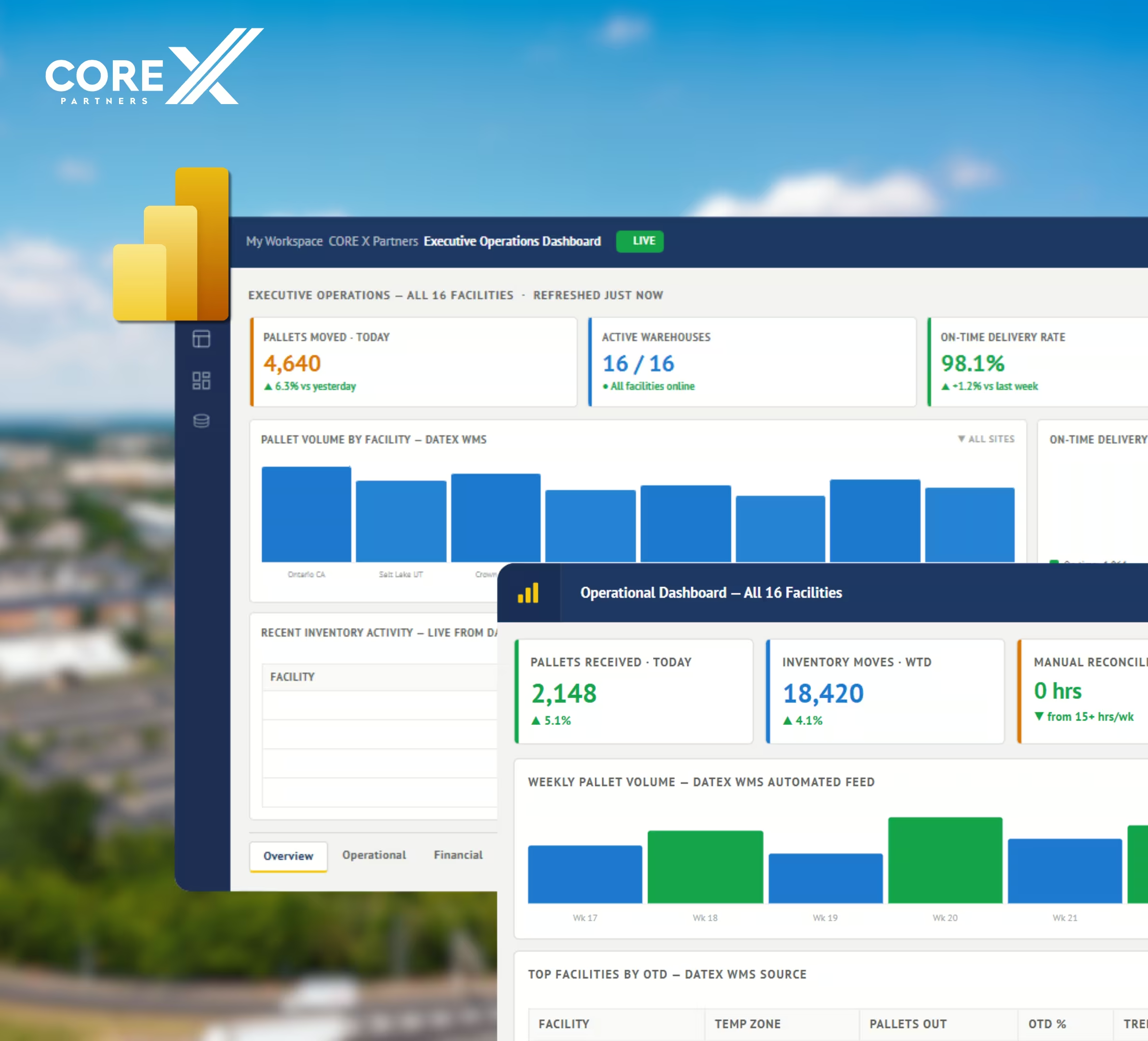
Cold Storage & Logistics: 16 Sites, 4 Systems, Zero Manual Exports
Core X Partners runs 16 cold storage facilities nationwide, each with its own operator and its own reporting workflow. Their ERP, WMS (Datex), CRM (Salesforce), and payroll system (UKG) all held pieces of the picture, but nobody had the whole thing without a manual pull. We built the integration layer connecting all four systems into a single Power BI model with automated refresh.
Proof the Integration Layer Works, Regardless of Your ERP
United Utility runs Sage 300, not Business Central, but the problem was the same one Business Central customers hit after go-live: seven operating divisions, each with different rules and rates, all reporting through manual timesheets and spreadsheets. We connected their ERP to Power Apps, Power BI, and Power Automate. It's the same integration layer we build around Business Central, applied to whatever core system you're actually running.

How Tampa Bay Businesses Use Business Central
Five Tampa Bay scenarios, from Ybor City cigar rooms to Pinellas seawall crews, where the standard screens need a deliberate setup.
Cigar makers and specialty tobacco shops that age leaf before it is sold
Cigar makers buy tobacco leaf by the bale from several countries and age it for months before it is blended and rolled. Business Central holds each bale as a lot (a tracked batch with its own receipt date and cost), so aged leaf shows its true carrying cost and the oldest stock goes to the rollers first. Business Central Premium builds each cigar line from a bill of materials (the list of leaf, binder, wrapper, and bands), so a customer favorite blend stays fixed even when a lot changes. Federal and state tobacco taxes sit outside standard Business Central, so the tax setup is scoped with your CPA. Power BI shows cost per cigar by blend.
Bakeries, tortilla makers, and food producers that deliver by route and take stale returns
A bakery loads trucks before dawn, drops product at groceries and restaurants, and picks up what did not sell the next morning. Business Central records each route truck as a location (a place where stock is held), so the morning load is a transfer and the evening count shows what sold. Returned bread posts as a return with a reason code, so stale rates by store and by driver surface instead of hiding inside revenue. Premium builds each production batch from a bill of materials, and lots carry the expiration date so the oldest batch ships first. Power BI shows margin and stale percentage by route, store, and product.
Managed IT, cybersecurity, and software resellers that bill a monthly mix of licenses and labor
A managed service provider (a firm that runs a client IT department for a monthly fee) buys licenses at a cost that changes every month and resells them to many clients at a margin. Business Central holds each client agreement as standard sales codes (saved sets of invoice lines), so monthly invoices come from one place. A Power Automate flow imports the vendor usage file, and vendor invoices match to those sales lines, so a cost increase shows as a margin drop on a named client instead of a surprise at quarter end. Project hours from the ticketing tool post to jobs, and Power BI shows margin per client and per vendor.
Contract packagers and supplement makers that hold materials their customers own
A contract packager fills, labels, and boxes products for brands that supply the bottles, powders, or cartons. Those materials sit in the warehouse but belong to the customer, so they cannot count as the packager's own inventory or cost of goods. Business Central handles this with a separate location or item set per customer, and lot numbers recorded at receipt let a recall trace back to the customer batch. The packager bills for labor, machine time, and its own materials, and Power BI shows yield and scrap by customer. A true customer owned inventory type is not a standard feature, so we confirm the setup with your auditor in the first weeks.
Ship repair yards, marine fabricators, and seawall and dock builders that bill by the job
A seawall or dock builder prices a job on pilings, concrete, and crew days, then changes the price when the water or soil is not what the survey showed. A ship repair yard writes a repair order that grows with every defect found once the hull is open. Business Central tracks each job as a project (a budget with actual costs posted against it), posts crew time and rented barge or crane days, and keeps each change order as its own line so margin on the original scope stays visible. Progress billing follows percent complete, and Power BI shows margin by job and by crew while work is open. Permits and engineering drawings live in SharePoint, since Business Central does not store them.
Business Central Licensing at a Glance
Microsoft US list pricing, current as of the September 2026 update. If you make physical products, you need Premium. If you sell services or trade goods, Essentials usually covers it. A Tampa cigar maker, bakery, or contract packager that builds from a bill of materials needs Premium; a reseller or service firm usually fits Essentials.
- Finance, sales, purchasing, inventory
- Basic CRM & project management
- Everything in Essentials
- Manufacturing (BOM, production)
- Service order management
Lighter users can be covered by a Team Member license at $8/user/month for read-only or light-entry access.
How Implementation Works
Discovery & Solution Design
We audit your current systems, data quality, and integration needs, then map them into a fixed-price roadmap before any build starts. Kickoff and training run by video, with an on-site visit at kickoff or go-live when the project needs one.
Configuration & Data Migration
Core modules configured to your business; legacy data migrated and validated.
Integration & Automation Build
Power BI, Power Automate, Power Apps, and any third-party connectors built in parallel with configuration, not after.
Testing, Go-Live & Training
Full functional and integration testing, then go-live with hands-on user training.
Optimize & Scale
We stay on to tune performance, extend automation, and add the Copilot/AI layer as adoption grows.

