

Business Central Consulting for Ohio Companies That Count Stores, Batches, and Seasons
We implement Business Central for Ohio businesses and connect it to Power BI, Power Automate, and Power Apps from day one, so your financial data does not stay stuck the way your last system's did. Our Hilliard office in the Columbus area hosts workshops for Central Ohio teams, and our US-based team, with no offshore handoff, serves the rest of the state, with a fixed-price roadmap after a free assessment.
What Is Business Central Consulting in Ohio?
In Ohio, Business Central consulting means choosing the right license, mapping your current books, stores, and inventory into Microsoft's cloud ERP (the accounting, inventory, purchasing, and sales software that replaces QuickBooks, Sage, or a spreadsheet stack), then connecting it to the tools your teams already use. Ohio companies often run a mix of plants, stores, and seasonal crews across three large metros and many small towns, so the work includes period calendars, labor cost rules, and training teams on more than one shift. It is complete when every location closes its books in the same system.
Your ERP Shouldn't Mean a Weekly Excel Export
Business Central is Microsoft's ERP for companies that have outgrown QuickBooks, Sage, or a spreadsheet-based finance stack but don't need the complexity, or cost, of Dynamics 365 Finance and Operations. Microsoft puts the installed base at over 50,000 organizations worldwide, most in the 20 to 1,000 employee range.
Store and plant results arrive late
Each location reports in its own spreadsheet, so the owner sees a month a few weeks after it ends.
Labor and seasonal costs sit outside the books
Workers compensation, overtime, and seasonal crews get spread by hand at month end.
Owners wait on the controller
A weekly Excel export is still the only way to see real numbers.
That's rarely a software problem. It's a scoping and implementation-partner problem, which is exactly what the sections below address.
Business Central Consulting, Implementation & Integration
We work across the full Business Central lifecycle: getting you live on the platform, connecting it to everything else you run on, and keeping it optimized after go-live. Most partners specialize in one of these. We built the firm around doing all three without a handoff between teams.
Live, Built to Connect From Day One
The end-to-end process of configuring Business Central to your business, migrating your data, and getting your team live: chart-of-accounts and G/L setup, module configuration, data migration, integration design, testing, and training.
Most implementation partners treat Power BI, Power Automate, and Power Apps as a phase two nobody schedules. We scope them in from the start, so the rollout doesn't just relocate the busywork instead of removing it.
- Discovery and data audit against your current systems
- Chart of accounts, G/L, and core module configuration
- Data migration and validation from your legacy system
- User roles, approval workflows, and security setup
- Integration and automation design built in, not bolted on
- Testing, go-live support, and user training
- Discovery and data audit against your current systems
- Chart of accounts, G/L, and core module configuration
- Data migration and validation from your legacy system
- User roles, approval workflows, and security setup
- Integration and automation design built in, not bolted on
- Location, period calendar, and labor cost setup for Ohio stores, plants, and crews
Connecting to Everything Else You Run On
Connecting your ERP to the other systems your business already runs on, so data moves automatically instead of getting re-typed. Business Central ships with native connectors for the most common cases and an open API layer for everything else.
- Power BI for real-time financial dashboards
- Power Automate for approval routing and PO workflows
- Power Apps for workflows standard screens don't cover
- Shopify & ecommerce for two-way order and inventory sync
- CRM systems (Dynamics 365 Sales, Salesforce)
- WMS, payroll & legacy systems via custom API
- Discovery and data audit against your current systems
- Chart of accounts, G/L, and core module configuration
- Data migration and validation from your legacy system
- User roles, approval workflows, and security setup
- Integration and automation design built in, not bolted on
- Testing, go-live support, and user training
- Discovery and data audit against your current systems
- Chart of accounts, G/L, and core module configuration
- Data migration and validation from your legacy system
- User roles, approval workflows, and security setup
- Integration and automation design built in, not bolted on
- Location, period calendar, and labor cost setup for Ohio stores, plants, and crews
Connecting to Everything Else You Run On
Connecting your ERP to the other systems your business already runs on, so data moves automatically instead of getting re-typed. Business Central ships with native connectors for the most common cases and an open API layer for everything else.
- Power BI for real-time financial dashboards
- Power Automate for approval routing and PO workflows
- Power Apps for workflows standard screens don't cover
- Shopify & ecommerce for two-way order and inventory sync
- CRM systems (Dynamics 365 Sales, Salesforce)
- Ohio operating tools: store sales files, payroll exports by workers compensation class, Shopify and wholesale portals, and floor scan apps
This is the layer most partners treat as an afterthought and the one we specialize in. If your go-live is done but reporting still means a manual export, this is where we start.
Explore Power Automate Development →See Power BI Development Services →
Before You Commit, and After You Go Live
The advisory work around implementation: license selection, fit-gap analysis, performance optimization for a system you're already running, and recovery for a rollout that stalled or underdelivered.
- Evaluating Business Central against QuickBooks, NetSuite, or Sage
- Auditing an existing instance that's underused or misconfigured
- Rescuing a stalled or over-budget implementation from another partner
- Planning a phased rollout across multiple entities or locations
- Ongoing managed support after another partner's implementation ended at go-live
Retiring Dynamics NAV or GP the Right Way
Moving off Dynamics NAV means converting old customizations into modern extensions, and Dynamics GP needs a full re-implementation. We cover both in detail on our main Business Central page.
Read the NAV and GP migration details →What This Looks Like in Practice
Neither engagement is Ohio specific. We show them because the integration layer is the same one we build around Business Central for Ohio businesses.
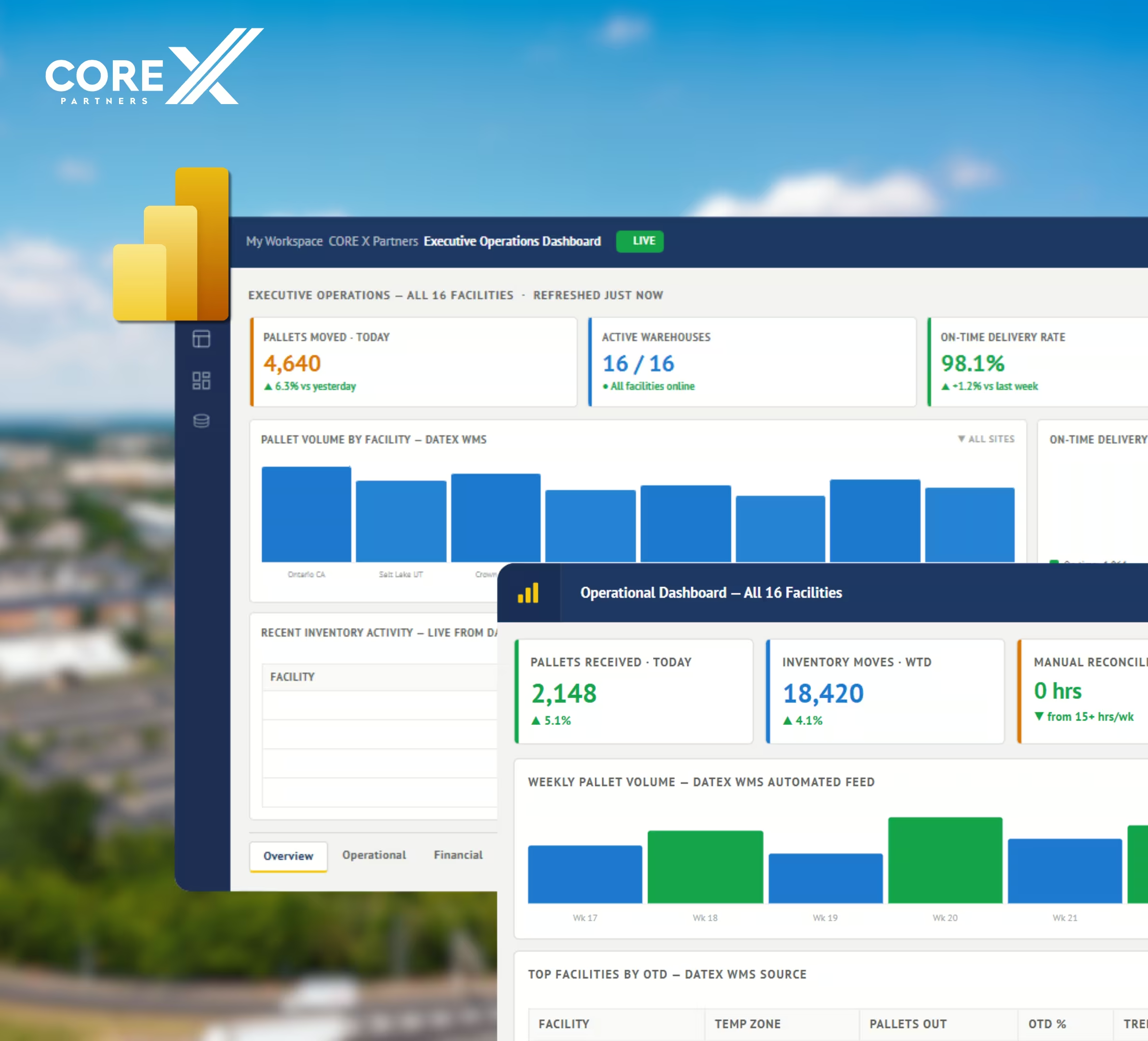
Cold Storage & Logistics: 16 Sites, 4 Systems, Zero Manual Exports
Core X Partners runs 16 cold storage facilities nationwide, each with its own operator and its own reporting workflow. Their ERP, WMS (Datex), CRM (Salesforce), and payroll system (UKG) all held pieces of the picture, but nobody had the whole thing without a manual pull. We built the integration layer connecting all four systems into a single Power BI model with automated refresh.
Proof the Integration Layer Works, Regardless of Your ERP
United Utility runs Sage 300, not Business Central, but the problem was the same one Business Central customers hit after go-live: seven operating divisions, each with different rules and rates, all reporting through manual timesheets and spreadsheets. We connected their ERP to Power Apps, Power BI, and Power Automate. It's the same integration layer we build around Business Central, applied to whatever core system you're actually running.

How Ohio Businesses Use Business Central
Six Ohio scenarios, from Columbus storefronts to Lake Erie snow routes, that show where Business Central earns its place.
Columbus multi-unit franchise and restaurant operators
Operators who own several franchised restaurants, fitness studios, or service outlets in the Columbus area run each location as its own profit center. Business Central tags every sale and expense with a store using dimensions (tags that let one ledger report many ways), so one chart of accounts produces a profit and loss per store. Daily sales from the point of sale system arrive as a summary journal rather than line by line, royalty and ad fund fees post each month as a percentage of net sales through a recurring journal, and a Power BI view ranks stores by labor and food cost. A new location joins as another dimension value instead of a new set of books.
Craft breweries and distilleries
Craft breweries and distilleries in Ohio's three largest metros sell the same batch as kegs, cases, and cans. Business Central tracks each package size as a unit of measure on one item, and Premium production orders (batch records that consume ingredients and produce finished stock) cost each brew by tank. Keg deposits post to a liability account when a keg ships and clear when it returns. A Power BI view of barrels produced and barrels sold gives the person who prepares federal excise returns one source to reconcile against. Taproom point of sale and distributor invoices can feed the same inventory count.
Snow removal and landscape contractors
Contractors who plow in winter and mow in summer bill on two different clocks. Seasonal fixed fees are billed in equal monthly installments, and a deferral template (a Business Central setting that spreads revenue over several periods) recognizes a prepaid fee across the months of the season. Per push work is logged in a Power Apps form by crew lead, site, and time, then turns into invoice lines at the contract rate. Subcontract operators paid per push post to the same site, so margin per site shows up before the next storm instead of in the spring.
Commercial printers and packaging converters
Print and packaging shops quote by run length: one price for 5,000, another for 25,000, and a different one if finishing goes to an outside vendor. Business Central stores quantity break prices by customer, runs each job as a production order in Premium, and compares estimated cost to actual cost when the job closes. Outside finishing becomes a purchase order tied to the production order, so the vendor invoice lands on the right margin. Paper and board stock is counted by roll or sheet size, and a Power Apps screen lets the press operator report spoilage at the machine.
Licensed team and campus apparel decorators
Decorators who produce licensed team and campus apparel for fans sell one design across many sizes and colors, and usually owe the license holder a royalty on net sales. Business Central handles size and color as item variants (versions of one item), so one design is not 40 separate items, applies wholesale and retail price lists, and syncs web orders and stock through the Shopify connector. Each design carries a licensor dimension, and a Power BI view totals net sales by licensor each quarter, so the royalty statement is built from the ledger instead of a spreadsheet.
Tier two and tier three automotive suppliers
Ohio plants that stamp, mold, or machine parts for the big auto assemblers get weekly releases from each customer, and a late shipment can mean a charge. Business Central holds a blanket sales order per customer (one order with scheduled deliveries), and a Power Automate flow loads each new release from the customer file or email so planners are not re-keying. Premium production orders cost each part against standard cost, so a material price jump shows up as a variance (the gap between planned and actual cost) per part. Returnable racks and totes are tracked as items at the customer location, so a lost rack is a number, not a surprise.
Business Central Licensing at a Glance
Microsoft US list pricing, current as of the September 2026 update. If you make physical products, you need Premium. If you sell services or trade goods, Essentials usually covers it.
- Finance, sales, purchasing, inventory
- Basic CRM & project management
- Everything in Essentials
- Manufacturing (BOM, production)
- Service order management
Lighter users can be covered by a Team Member license at $8/user/month for read-only or light-entry access.
How Implementation Works
Discovery & Solution Design
We audit your current systems, data quality, and integration needs, then map them into a fixed-price roadmap before any build starts. Workshops run at our Hilliard office for Central Ohio teams, at your site for Cleveland, Cincinnati, Toledo, and other Ohio locations, and by video between sessions.
Configuration & Data Migration
Core modules configured to your business; legacy data migrated and validated.
Integration & Automation Build
Power BI, Power Automate, Power Apps, and any third-party connectors built in parallel with configuration, not after.
Testing, Go-Live & Training
Full functional and integration testing, then go-live with hands-on user training. Training runs by role, with sessions timed around store openings, plant shift changes, and season starts, so nobody learns the system in the middle of a rush.
Optimize & Scale
We stay on to tune performance, extend automation, and add the Copilot/AI layer as adoption grows.

