Scale Your Operations with Power Automate Development Services in
Atlanta
Payment reconciliation files land in one inbox, get re-keyed into another. Freight and inventory status sits in a spreadsheet until someone remembers to check it. Atlanta operations teams — payments processors, logistics operators, healthcare groups — lose hours a week to hand-offs a flow could run in the background. We have shipped 250+ Power Automate projects with a 96% client retention rate, and for Atlanta clients that team isn't flying in — Sunflower Lab has an office on Peachtree Street, downtown.
End-To-End Power Automate Consulting for Atlanta
Power Automate development is the practice of building automated workflows on Microsoft's Power Automate platform (part of the Power Platform) connecting apps like SharePoint, Dynamics 365, Outlook, and other systems so data moves between them without manual entry. For Atlanta businesses running Microsoft 365 or Dynamics 365, this typically means automating payment reconciliation and KYC document checks for financial-services teams, freight and inventory status updates for logistics operators, and claims routing for healthcare groups, cutting the hours a team spends copying data between systems by up to 80%.
Strategic Automation Planning
Before any flow gets built, we spend time inside your Atlanta team's actual process — where a file sits waiting, who's re-entering data twice, what's worth automating versus what needs a process fix first. Common candidates we see in Atlanta: payment reconciliation, KYC document checks, freight and inventory status updates. You leave with a prioritized roadmap, not a guess.
Power Automate Design & Development
We build cloud flows on Microsoft's 750+ connectors first, and write a custom API connector only when nothing off-the-shelf fits. Error handling and retry logic go in at build time, not after something breaks mid-shift. Most single workflows for Atlanta clients are live in 1-2 weeks.
Power Automate Integration
Dynamics 365, SharePoint, payment-processing platforms, or the warehouse management system already running your Atlanta operation, we connect it inside your existing Microsoft tenant and security setup. No rip-and-replace, no extra vendor to manage.
Power Automate Desktop Service
Legacy payment platforms, older warehouse/freight systems, state systems with no API: Power Automate Desktop clicks and types through the screen the way your team already does, just faster and unattended. Common uses in Atlanta: reconciliation intake, inventory checks, overnight batch runs.
Ready-To-Use Flow Templates
We deploy pre-designed automation blueprints to quickly integrate core processes and optimize operations. These are widely used and high in demand.
Intelligent Document Processing (IDP)
Extract unstructured data from incoming PDF documents using AI Builder OCR and parse information directly to target databases.
Deploy IDP SolutionDocument Ingestion
Invoices or files arrive in Outlook attachment or SharePoint folder.
AI OCR Parsing
AI Builder parses metadata: amounts, vendor names, dates.
Verification Sync
Metadata verified and loaded straight to ERP database systems.
Invoice Approvals
Establish strict, multi-stage approval routings for incoming accounts payable invoices based on departments.
Deploy Invoice FlowParse Invoice
Verify vendor records and extract total invoice amount.
Dynamic Routing
Teams notifications route approvals directly to department managers.
Ledger Update
Approved expenses ledger synced automatically inside ERP database.
Purchase Order Automation
Eliminate manual entry mistakes by connecting purchase request portals to vendor order systems.
Automate PO OrdersPO Submission
Request logged inside SharePoint / Power Apps form portal.
Supplier Dispatch
Approved request dispatched straight to vendor via API connector.
Inventory Check
Inventory counts updated upon warehouse receipt registration.
Onboarding & Offboarding
Synchronize account provisioning and license assignments across HR, IT, and operational divisions.
Streamline OnboardingCandidate Logged
HR marks candidate as hired inside application dashboard.
Credential Provisioning
Automate Active Directory account setup and Office 365 licensing.
Equipment Allocation
Dispatches alerts to IT team for hardware logistics preparation.
Real-World Automation Success Stories
See how our low-code integrations save hours, minimize error overhead, and connect data streams.
7 divisions on one platform, 40+ hours of manual work cut weekly, $250K+ annual labor savings, delivered in under 60 days.
United Utility ran electrical construction across 7+ divisions with payroll errors, billing delays, and zero real-time visibility eating into operations. We built 20+ Power Apps including a custom payroll logic engine for union hall rules plus 14+ Power BI reports, delivered in under 60 days. Result: 40+ hours of manual work cut weekly, 100% payroll accuracy, all divisions unified on one platform, and $250K+ in annual labor savings.
View Case Study
200+ hours saved daily across departments for an IONM provider
A leading provider of Intraoperative Neuromonitoring (IONM) services, combining clinical expertise with real-time technology to enhance surgical outcomes.
View Case Study
Inspections From 15 Minutes to Seconds
Dominion Engineering's product inspections took 15 minutes each, with data scattered across disconnected systems. We connected SharePoint and Dynamics 365 through Power Automate, auto-generating inspection tickets and Teams alerts on every receipt trigger. Result: inspection time cut to seconds, 10-15 hours saved weekly, and 60 hours saved monthly in receivables.
View Case Study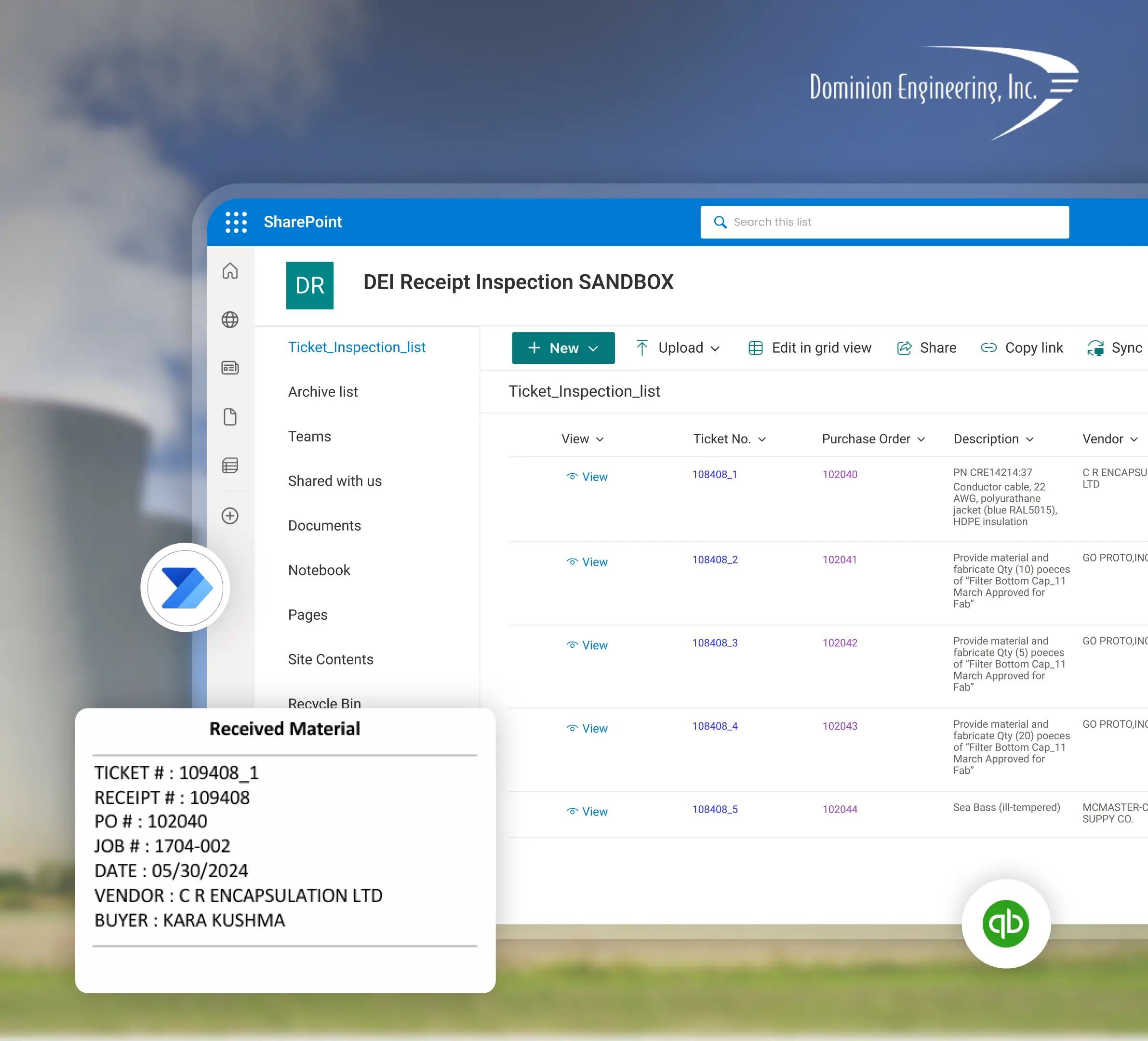
90% Faster Onboarding and Credit Approvals
A metal powder manufacturing company's onboarding and credit processes were slow and error-prone, with delivery reports taking up to 5 hours. Power Automate cut onboarding and credit processing time by 80-90%, dropped delivery reports to under an hour, and minimized human error in credit approvals.
View Case Study
Explore More Capabilities
Power Automate work across every state Sunflower Lab serves, plus the rest of the Power Platform stack.
Power Automate in Ohio
How Columbus-area insurers and manufacturers automate claims routing and inspection reporting.
View pagePower Automate in New Jersey
How NJ manufacturers and financial-services teams automate invoice approvals and onboarding.
View pagePower Automate in Florida
How FL insurance and healthcare back-office teams cut manual claims routing.
View pagePower Automate in Texas
How TX manufacturers and financial-services firms connect Dynamics 365 to Power Automate.
View pagePower Automate Consulting & Development
The full service page — every capability Sunflower Lab builds, not just Atlanta's.
View pagePower Apps Consulting
Custom canvas and model-driven apps built on the same Power Platform stack.
View pagePower Pages Development
External-facing portals for the same systems Power Automate connects to.
View pageFAQ
Talk to our Power Automate experts
Free 30-minute discovery call. We'll audit your workflows, estimate timelines, and help you map out your automation goals.