Power Automate that closes the gap between your systems. Not another dashboard nobody opens.
We help Dallas-Fort Worth finance, operations, and supply-chain teams stop re-keying the same data between ERPs, CRMs, and spreadsheets. One team maps the hand-off, builds the flow, and leaves your IT team a runbook they can actually maintain.
Power Automate, in plain English
TL;DRPower Automate is Microsoft's built-in "if this, then that" tool. A trigger fires (a form's submitted, a file lands in a folder, a record changes status), a condition or two gets checked, and the actions that follow run on their own — route it for approval in Teams, update the ERP, notify the right person.
Cloud flows connect anything with a modern connector — Dynamics 365, SharePoint, Salesforce, Outlook, Teams. Power Automate for Desktop (desktop RPA) drives the systems that don't — the legacy accounting screen, the carrier portal, the vendor site with no API. Most Dallas-Fort Worth engagements need both working together in the same flow.
Where Dallas-Fort Worth teams typically get stuck with Power Automate
Most Dallas-Fort Worth companies we work with already own Power Automate — it ships with their Microsoft 365 license. The gap isn't the tool. It's that a flow that actually holds up needs a scoped process, working connectors, and someone watching it once it's running unattended in production.
The exception path was never written down
"If it's a wire over $25K, escalate to compliance" lives in someone's head, not the flow — so the first edge case breaks it.
Half the stack has no connector
Carrier and logistics portals, older CRMs, and legacy ERPs common in DFW finance and distribution shops often need desktop RPA, not a stock cloud flow.
Flows fail quietly
A flow breaks overnight and nobody's watching. A reconciliation is off by Monday and nobody can say why.
The premium-connector bill surprises finance
Per-flow, per-user, and AI Builder credits show up on invoice two, and nobody budgeted for them.
Four things that separate a Power Automate program that lasts from one that gets shelved in six months
The tool itself is not the hard part. The four factors below are what actually decide whether your Power Automate program pays back for years or quietly falls apart the first time someone leaves the company. Every engagement we run puts each one in place before we hand over.
A governance body — someone owns the automation program
What it is. A named group — often just two or three people, one from IT and one from operations — that reviews every new flow request, kills flows nobody uses anymore, and decides what gets built next.
Why it matters. Without a named owner, flows sprawl. Requests pile up faster than they ship, priorities get set by whoever emails loudest, and the flow that broke six months ago is still sitting broken. A governance body is the one thing that turns "we use Power Automate" into "we run an automation program."
What to define upfront. Who signs off on new flows. How you rank priority when three teams want their process next. What your ROI threshold is — the number below which you politely say no. And who arbitrates when the queue is on fire and something has to give.
A centralized dashboard — one place to see every flow's health
What it is. A single Power BI (or equivalent) dashboard that shows every flow in the tenant — its last run, its success rate, its failure alerts, its named owner, and its measured payback against the process it replaced.
Why it matters. A business owner should not have to log into the maker portal to know whether their automation is working. When a flow silently fails at 2 a.m. Saturday, someone needs to see it before Monday morning — not two months later when an invoice is missing.
What to show on it. Last run and status. Rolling failure rate. Time saved vs. the baseline process. Cost consumed (Per-Flow, Per-User, or AI Builder credits) vs. the value delivered. Every flow's named owner and last-updated date.
Documented process — before, after, and what changed for people
What it is. A one-page write-up per flow that answers three questions: how the process worked before, how it works now, and what changed for the people involved — including who was trained on the new way and how the old work was retired.
Why it matters. This is what lets the automation survive turnover, audits, and the "why does this exist?" question a year later. It is also what lets a new team member fix the flow without hunting down the person who left in 2024.
What to capture. The as-is process on one page (steps, people, systems, exceptions). The to-be process on one page (trigger, conditions, actions, owner). The change-management notes — who was affected, what they had to stop doing, what training they got, and how you measured that the change stuck.
A prioritization framework — a written rule for what comes next
What it is. A method for ranking automation requests when there are more requests than there is capacity. Something as simple as scoring each request on impact, urgency, and effort — and picking the top three each quarter — beats picking by whoever asked last.
Why it matters. When every department wants their process automated, someone will choose. It should be a rule, not a favor. It should also cover the reverse case — when three flows break the same Monday morning, which one gets fixed first.
What to write down. The scoring you use for new requests. The tie-breaker when scores match. Who arbitrates. The ROI threshold below which the answer is no. And the incident rule: what "high severity" means and who is on call for it.
Note on fit: if your workflow is truly one-of-a-kind or requires deep hardware integration, a custom build may still win. For 90% of Dallas-Fort Worth ops workflows we see, Power Automate replaces the manual copy-paste directly — provided the four factors above are in place from day one.
The six flows that pay back fastest
Across 100+ Power Platform builds, these six patterns come up in almost every engagement — and they are the ones that pay back the fastest. Each links to the case study that proves it.
Invoice & PO approval routing
An invoice hits the shared mailbox → the flow reads the amount, routes it to the right approver in Teams, files the PDF, and posts the entry to your ERP.
SFL clients: up to 85% invoice-processing reductionCustomer & employee onboarding
A form triggers the flow → adaptive card in Teams, salesperson auto-assigned, credit check with the third-party service, data pushed to the ERP.
Metal manufacturer: 90% reduction — 60 hrs → 6 hrs per customerRCM & verification-of-benefits bots
Desktop bots log into payer portals, verify eligibility, extract patient data, and update your billing system — 24/7, including weekends.
Neuromonitoring Service Provider: 200+ hours saved daily across departmentsInspection ticket & QAQC routing
A purchase receipt in D365 auto-creates an inspection ticket, attaches the CR number, notifies the inspector in Teams, and pings if unassigned after 24 hours.
Dominion Engineering: 90% efficiency, 60 hrs/month savedOEE & shift-report automation
Plant-floor entries flow from Power Apps → Azure SQL → Power BI, replacing multi-plant Excel workbooks and CyberQuery reports.
MAI: 40–60% report-generation-time reduction expectedDocument extraction with AI Builder
Contracts, safety sheets, and SOPs get parsed by AI Builder, key fields pushed into SharePoint or Dataverse, and full text made searchable — with an optional ChatGPT layer for Q&A.
SFL manufacturing SOP search: enterprise-ChatGPT enabledWhat our Power Automate Consulting covers
Every engagement covers three tracks: mapping the process before we build, building the cloud and desktop flows, and setting up the monitoring and governance so the flows keep running after we hand over.
Map the actual process — not the wish list
- Process walkthroughs with the people who do the work today
- Documented "as-is" flow with real exceptions (returns, escalations, edge cases)
- "To-be" flow design with clear triggers, conditions, actions, and owners
- Written scope, licensing recommendation, and fixed price by end of week one
Cloud flows + Desktop RPA together
- Cloud flows across SharePoint, Dynamics 365, Outlook, Teams, Forms, SQL Server, Salesforce, SAP
- Desktop RPA (Power Automate for Desktop) for legacy ERPs, payer portals, and browser-only apps
- Custom and premium connectors for Infor M3, IFS Oracle, Sage 300, Cadwell, Revedy, Waystar
- AI Builder document extraction, sentiment, and prediction models where they earn their credit cost
- Teams adaptive cards for approvals so users never leave Teams
Keep flows running unattended
- Environment strategy (dev / test / prod) with proper solution promotion
- DLP policies aligned with your data classification
- Named ownership and application lifecycle for every flow
- Failure alerting and a live Power BI dashboard of flow health
- Licensing review — Per Flow vs Per User vs Process, and AI Builder credits
- Team training on Central time plus a written runbook
Typical 2 to 6 week timeline per flow
Cloud-only flows usually ship in two to four weeks. Flows that require Desktop RPA against a legacy system take four to six. Larger portfolios (a dozen flows) are staged in waves so early wins fund the later work.
Process discovery
A 30-minute call, then a 3-day walkthrough of the actual process — who does what, where the exceptions live, which systems touch it. Written scope by end of week one.
Build & connect
Cloud flow built in your tenant with real connectors. Desktop RPA added for legacy portals or ERP screens that have no API. Adaptive cards for Teams approvals.
Test & harden
Real invoices, real cases, real forms. Retry logic, error handling, and failure alerting added. Named runs go into a health dashboard your team can watch.
Handover & monitor
Environment and DLP setup, ownership assigned, written runbook, live training for admins and end users. 30 days of post-launch support included.
Selected Power Automate engagements
Three Power Automate engagements across nuclear-power engineering, metal-powder manufacturing, and healthcare technology. Each began with a manual process nobody wanted to keep doing and ended with a set of monitored flows that run unattended.
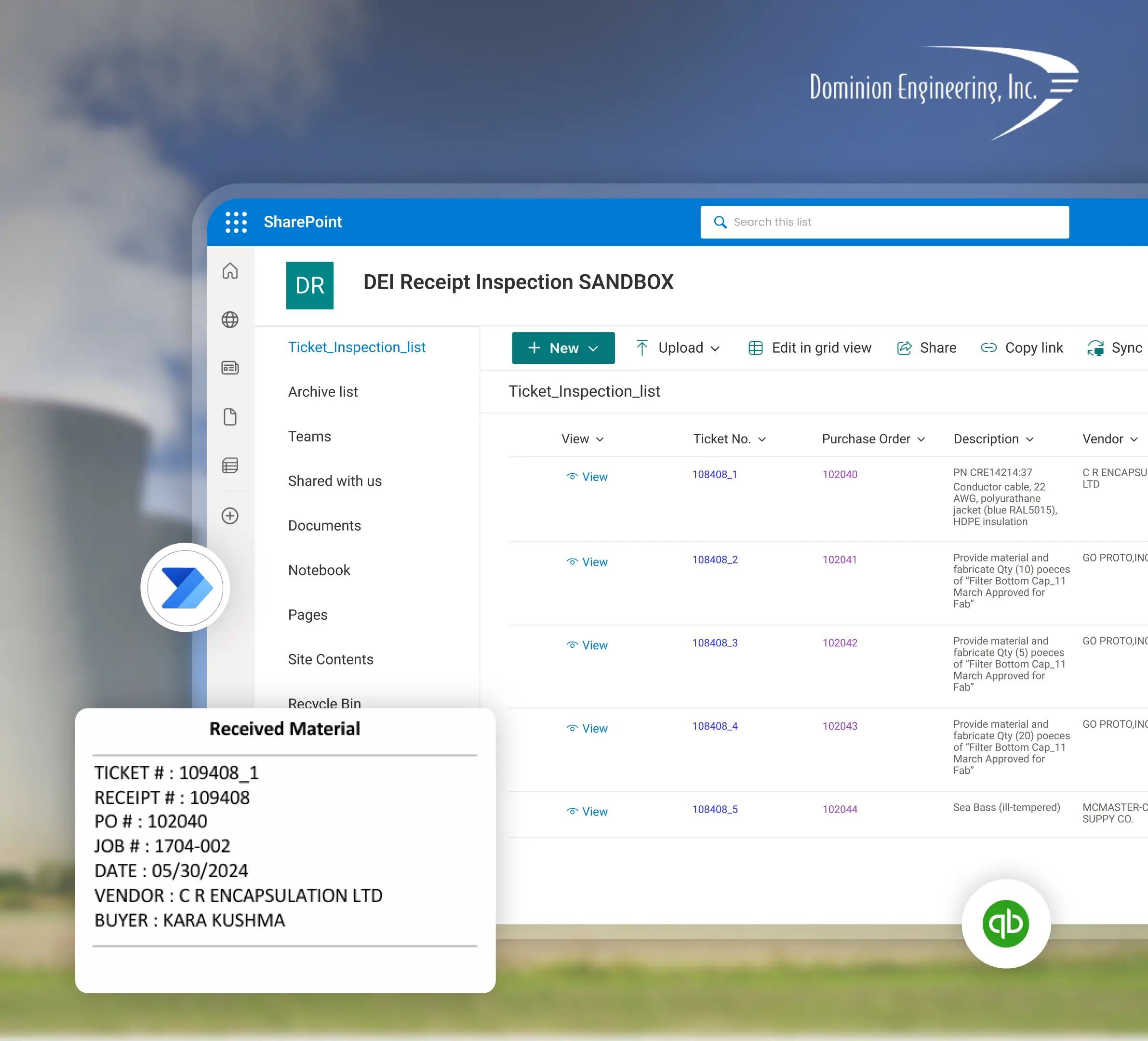
90% efficiency on inspection tickets
Half of the team's time was spent typing receipt information into Dynamics 365 by hand, chasing missing CR numbers in QuickBase, and emailing inspectors about 50–70 receipts a day. Scope of work: an automated flow that creates the inspection ticket on every D365 purchase-receipt event, auto-attaches files with a naming convention, pulls CR numbers from QuickBase, notifies the right inspector in Teams, and reminds anyone with an unassigned ticket after 24 hours.

Automated customer onboarding & credit approval
Sales distributed Word documents for new customers to fill out, then re-typed the answers into Infor M3, and every credit approval took roughly two hours — capping the team at four approvals per eight-hour day. Scope of work: a Teams bot with Adaptive Cards, Microsoft Forms deployment to customers, automatic salesperson assignment, Allianz credit-check integration, and direct data push into Infor M3 ERP.

200+ hours saved daily across departments
An intraoperative neuromonitoring service provider was processing 250+ patient cases per day manually, at 45–60 minutes each, with reader-pay calculations, VOB checks, and CMS-1500 updates all done by hand. Scope of work: a Cadwell three-step processing pipeline (ZinniaX → Cadwell & Revedy → CMS-1500), a Reader Pay bot, VOB bots for UHC and Waystar, 24/7 scheduled bots that clear weekend backlogs, and a Power BI dashboard for real-time bot health.

Real-Time Labor & Margin Visibility for Pediatric Practice
Connect Pediatrics (7929 Brookriver Dr Ste 770), a multi-branch pediatric practice, had no patient-level visibility into revenue, payroll cost, labor percentage, staffing percentage, or overtime exposure, leaving margin risk buried in manual reports. Sunflower Lab built a Power BI dashboard on SharePoint with branch, patient, and clinician-level views, plus automatic outlier detection for high labor percentage, excessive overtime, and understaffing.

Certified Microsoft Solutions Partner
Sunflower Lab holds Microsoft Solutions Partner status for Power Automate, Power Apps, and SharePoint. This designation requires audited technical delivery, application-lifecycle discipline, and client-outcome standards defined by Microsoft.
Frequently asked questions
Request a Power Automate consultation
Schedule a 30-minute call to walk through one process you would like to stop doing by hand. You will receive a written scope tailored to your environment and a fixed-price estimate within three business days.