Connect Dynamics 365 to the Systems Your Miami Team Actually Uses
We connect your existing Dynamics 365 deployment to Power BI, Power Automate, and Power Apps from our Brickell office at 601 Brickell Key Drive — the layer most Dynamics 365 implementation partners skip once go-live is done. We work alongside your current D365 partner or internal IT team across Miami's hospitality, trade, healthcare, and financial-services sectors; we're not here to replace them, we're here to close the gap they leave. The same certified Power Platform team behind Sunflower Lab's statewide Florida practice builds the integration, with in-person kickoff available locally.
What Is Dynamics 365 Consulting?
Dynamics 365 consulting is the work of implementing, integrating, or extending Microsoft's ERP and CRM platform so it actually gets used, not just deployed. That includes connecting Dynamics 365, whether you're on Business Central, Finance and Operations, or the CRM apps, to your Microsoft 365 environment, automating the manual steps around it, and building the reporting layer your leadership team looks at. Sunflower Lab focuses specifically on the Power Platform side of that equation: what happens around Dynamics 365 once the core system is live, including for the hospitality, trade, healthcare, and financial-services companies that make up much of Miami's Dynamics 365 client base.
Your Dynamics 365 Investment Is Probably Underperforming. Here's Why.
Dynamics 365 has real momentum. Microsoft's latest numbers put it at roughly 5.2% of the global CRM market, growing 16% year over year, with Copilot now built into Sales, Service, and Marketing. But owning the platform and getting value from it are two different things.
The uncomfortable industry number: a majority of CRM implementations fail to meet their original objectives, and it's rarely the software. It's usually one of three things we see over and over in Dynamics 365 environments:
Data stays siloed
Finance is in D365, operations reporting is still in Excel, and nobody trusts either version.
Nobody automated the busywork
Approvals, data entry, and reconciliation still happen by hand because the implementation partner's scope ended at go-live.
The platform is invisible to leadership
No dashboard, no Copilot layer, no way for a COO to see what's happening without asking someone to pull a report.
If any of that sounds familiar, the problem usually isn't Dynamics 365. It's that nobody built the layer on top of it.
We Extend Dynamics 365. We Don't Compete With Your ERP Partner.
What we do is the part most Dynamics 365 partners treat as an afterthought: making the platform actually usable day to day.
Data Integration & Unification
We connect Dynamics 365, whether that's CRM, Business Central, or Finance and Operations, to Power BI, your data warehouse, and the rest of your Microsoft 365 stack, so your ERP data isn't stuck in one system.
Workflow Automation with Power Automate
Approval chains, invoice routing, credit checks, order processing. We build the automations around Dynamics 365 that eliminate the manual steps your team is still doing by hand.
Explore Power Automate Development →Custom Apps with Power Apps
When Dynamics 365's standard forms don't fit how your team works, we build custom Power Apps that read and write directly to your Dynamics data. No rip-and-replace required.
See Power Apps Development →Reporting & Analytics with Power BI
Real-time dashboards built directly on your Dynamics 365 data, so your leadership team stops waiting for a weekly export.
See Power BI Development Services →RPA for Legacy-System Bridges
When Dynamics 365 needs to talk to a system with no clean API, which is common in manufacturing and logistics, we use RPA to bridge the gap without a custom integration project.
Explore RPA Consulting Services →Modernize Core Business Operations for Miami Businesses with Business Central
Dynamics 365 covers two different ERP products depending on company size. Finance and Operations is built for large, multi-entity enterprises. Business Central is built for growing mid-market companies, which is where most of our clients live. Either way, we don't build the core module. We build the layer on top that makes it worth using.
For Large, Multi-Entity Miami Enterprises
F&O handles complex, multi-currency operations across entities, and it's usually the biggest line item in a Dynamics 365 rollout. We work alongside your F&O implementation partner or in-house team on:
- Automating reconciliation and approval workflows around F&O finance processes
- Power BI dashboards built on F&O data for your CFO and operations leads
- An AI/Copilot layer so your team can ask questions instead of building new reports
For Growing Miami Mid-Market Companies
Business Central is Microsoft's ERP for companies that have outgrown QuickBooks or a legacy accounting system but don't need F&O's complexity. Deployments move faster, but the same gap shows up after go-live. We help with:
- Connecting Business Central to Power BI so financial reporting doesn't live in spreadsheets
- Automating purchase approvals, vendor onboarding, and inventory workflows in Power Automate
- Building Power Apps for the workflows Business Central's standard screens don't cover
Dynamics 365 CRM: Where We Fit
Dynamics 365 CRM, built on the Sales application, gives your team a system for the full deal cycle, lead to close. Most rollouts stop at the standard forms and views. Six months later, reps are still keeping their own spreadsheet next to the CRM, and the pipeline numbers in a forecast review don't match what's actually in the system. We don't run the initial CRM implementation. We come in around it, either alongside your implementation partner or after go-live, and build the layer that gets the CRM actually used and actually trusted.
Getting the Data and Process Right
A CRM is only as good as what's in it. Before automation or reporting means anything, the underlying data and process need to hold up. We work on:
- Email integration and Server-Side Sync so activity logs itself instead of relying on reps to type notes
- Contact and account data cleaned up and structured so lead scoring and territory rules actually work
- Product and pricing catalogs built out so quotes don't require a spreadsheet on the side
- Quote-to-invoice workflows connected so a closed deal doesn't stall waiting on finance
Making the Pipeline Something Leadership Trusts
Once the foundation is solid, the CRM can start doing work on its own. We build:
- Power BI dashboards built on CRM data so a forecast review doesn't start with "let me pull a report"
- Power Automate workflows for lead routing, approvals, and follow-up reminders reps won't ignore
- Power Apps for the exception workflows the CRM's standard forms don't cover
- Security roles and system administration set up so the right people see the right pipeline, nothing more
Dynamics 365 Sales & Marketing: Where We Fit
Sales and Marketing are built to run on the same platform, and that's usually where the disconnect actually shows up. Marketing runs a campaign and calls the resulting leads qualified. Sales looks at the same leads and doesn't trust them. Fixing that isn't a licensing problem, it's integration work: a shared scoring model, a clean handoff, and reporting both teams look at and believe. That's what we build.
Closing the Gap Between "Qualified" and "Sales-Ready"
Most Sales and Marketing disputes come down to a lead scoring model nobody agreed on. We build:
- Lead scoring built on your actual conversion data, not a default template neither team believes in
- Automated handoff rules so a marketing-qualified lead lands in the right rep's queue with context attached
- Journey and nurture automation connected to Sales activity, so outreach doesn't collide with a live campaign
- Consent, unsubscribe, and segment data synced across both apps so compliance doesn't depend on manual updates
One Funnel View for Both Teams
Marketing and Sales usually run separate reports that never quite agree. We build:
- Power BI dashboards blending Marketing engagement data with Sales pipeline stages
- Campaign attribution tied through to closed revenue, not just clicks and form fills
- Power Automate workflows keeping campaign and pipeline data in sync without manual exports
- AI-assisted lead summaries so a rep walks into a call already knowing the touchpoints that got them there
What This Looks Like in Practice
Cold Storage & Logistics: From Weekly Excel Exports to Real-Time KPIs
Core X Partners runs cold storage and logistics across multiple warehouses. Dynamics 365 was already their system of record for ERP data, but the team was still updating operational metrics in Excel every week. We built the integration layer connecting Dynamics 365, their warehouse management system, and their CRM directly into Power BI. Result: 16 warehouses reporting in real time, 3 systems unified into one dashboard, zero manual weekly Excel exports left.
View Case Study
Inspections From 15 Minutes to Seconds
Dominion Engineering's product inspections took 15 minutes each, with data scattered across disconnected systems. We connected SharePoint and Dynamics 365 through Power Automate, auto-generating inspection tickets and Teams alerts on every receipt trigger. Result: inspection time cut to seconds, 10-15 hours saved weekly, and 60 hours saved monthly in receivables.
View Case Study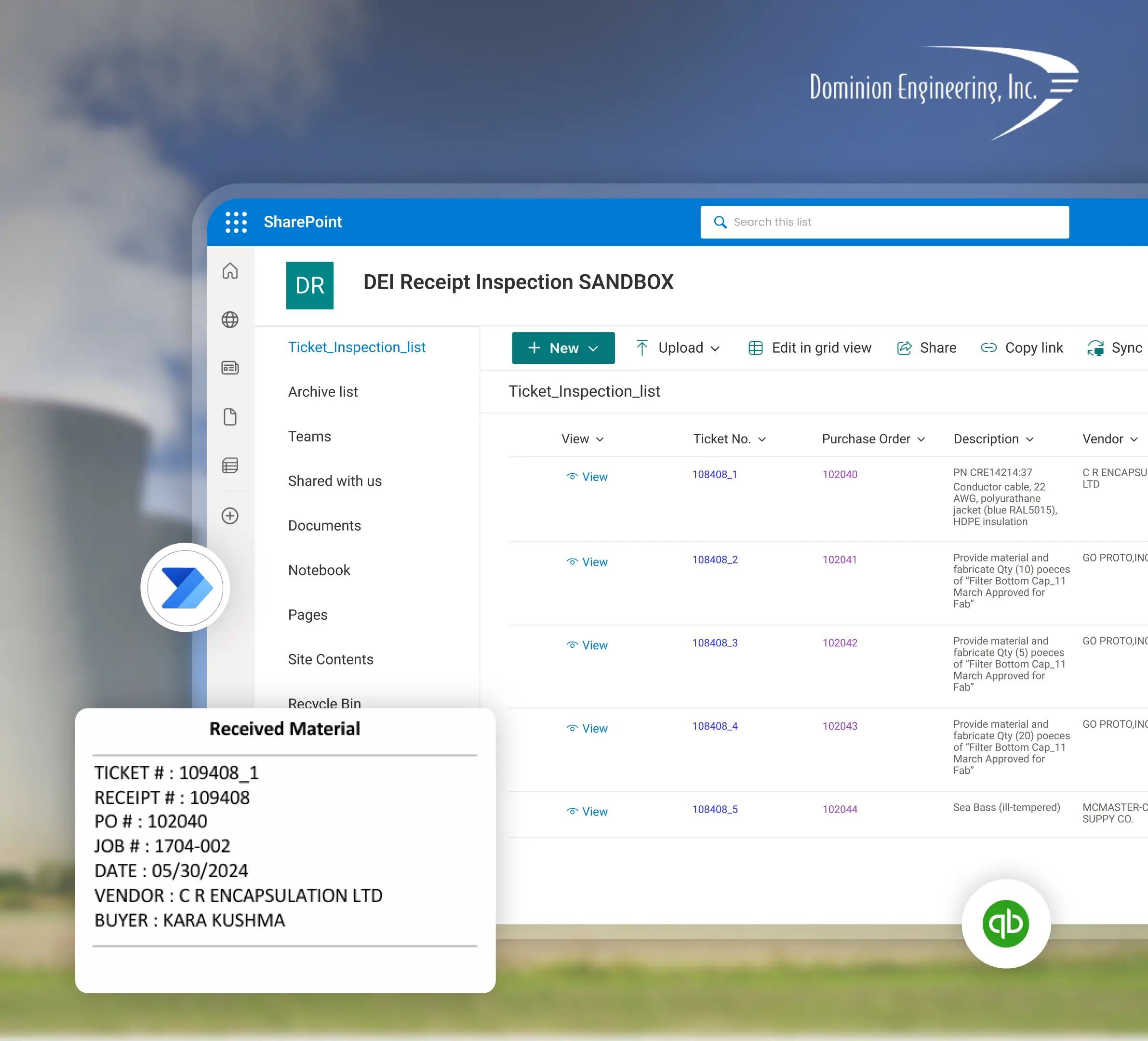
Dynamics 365 vs. Legacy ERP
If you're deciding whether it's time to move off an older on-premise system, here's what actually changes.
| Features & Capabilities | Dynamics 365 | Legacy ERP |
|---|---|---|
| Deployment | Cloud-based, always on the current version | On-premise, manual upgrade cycles |
| Cost structure | Subscription, treated as an operating expense | Large upfront license plus ongoing maintenance contracts |
| AI & automation | Copilot and Power Automate built in | Bolted on through third-party tools, if available at all |
| Reporting & data access | Native connection to Power BI, Power Apps, and Teams | Custom integrations built and maintained separately |
| Scaling | Add users or modules as you grow | Often requires a re-implementation to scale |
Planning Microsoft Dynamics 365 Implementation with Sunflower Lab
Discovery & Data Audit
We map where your Dynamics 365 data currently lives, where it's siloed, and where manual work is happening around it.
Integration & Automation Design
We scope exactly which workflows get automated and which systems get connected, with a fixed-price roadmap before any build starts.
Build & Deploy
Our certified Power Platform developers build the integration, automation, or app layer in focused sprints, typically 4–8 weeks depending on scope.
Optimize & Scale
We stay on to tune performance, add new automations, and extend the Copilot/AI layer as your Dynamics 365 usage grows.